
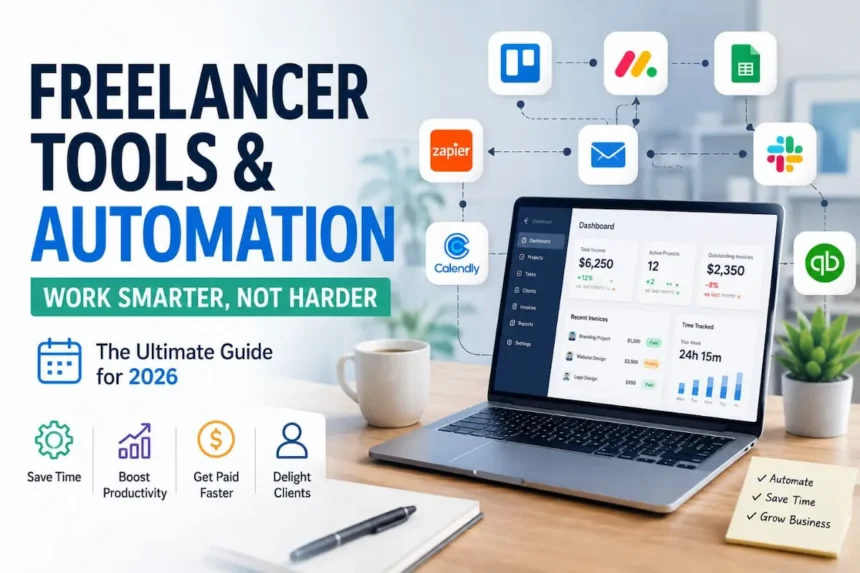
Quick Answer: The best freelancer tools and automation stack in 2026 can save you 20 to 30 hours per month on admin work, the equivalent of five to seven extra weeks of billable time per year. This guide covers the exact tools, real automation workflows, and a step-by-step implementation plan for under $150 per month.
Time is your most valuable asset as a freelancer. Yet most freelancers spend 10-15 hours per week on admin work that could be completely automated: invoicing, time tracking, client follow-ups, proposal generation, social media posting, email management, and data entry.
According to n8n’s 2026 Automation Report, freelancers who implement automation tools and workflows save an average of 20-30 hours per month on repetitive tasks. That’s the equivalent of adding an extra 5-7 weeks of billable work to your year, without hiring anyone.
The catch? You need to know which tools to combine, how to connect them, and which automations actually deliver ROI.
This guide walks you through everything you need to know about freelancer tools and automation in 2026, including real automation workflows that work, pricing breakdowns, and a detailed case study of one freelancer who went from 30 hours of admin work per week to 5 hours, and grew her revenue 40% in the process.
Disclosure: Some links in this article may be affiliate links, which means Incomora may earn a commission at no extra cost to you.
The Freelancer Tool Stack Problem
Before we dive into solutions, let’s understand the problem most freelancers face.
The typical freelancer’s workflow in 2025-2026:
- Client emails arrive → you read them manually
- Project kickoff → you manually create task lists in three different places
- Time tracking → you manually log hours
- Invoice due → you manually create and send invoice
- Payment arrives → you manually reconcile in spreadsheet
- Client needs update → you write the same email you wrote last week
- Invoicing deadline approaches → you scramble to compile who paid what
Each of these is a 5-30 minute task. Do this daily, and you’re losing $300-$600/month in billable time (at $75-150/hour). At $100/hour, that’s $3,600-$7,200 per year wasted on repetitive work.
The tool buying trap:
Most freelancers then go overboard. They buy:
- Invoicing tool + accounting tool + project management tool + CRM + time tracking + email scheduler + social media scheduler + AI writing tool + accounting tool = 8-12 different platforms
Each platform costs $10-50/month. Total: $80-300+/month. They don’t integrate. Nothing talks to anything else. You’re still manually copying data between platforms.
The solution isn’t more tools. It’s the right tools connected together.
The Core Freelancer Tools and Automation Stack: What You Actually Need
Let’s break down the essential categories and the best tools in each:
1. Invoicing & Accounting (Non-Negotiable)
This is where most freelancers leave money on the table. Late invoices = late payments = cash flow problems.
| Tool | Cost | Best For | Key Feature |
|---|---|---|---|
| Wave | Free–$16/mo | Beginners, simple invoicing | Forever free invoicing + basic accounting |
| QuickBooks Self-Employed | $9.50–$38/mo | Complex deductions, taxes | Expense tracking, tax prep |
| FreshBooks | $6.50–$25/mo | Recurring clients, retainers | Automatic payment reminders, expense tracking |
| Stripe Billing | 2.2% + $0.30/txn | SaaS freelancers | Subscription billing automation |
Quick pick: If you have 1-10 clients and under $100K revenue: Wave (free).
If you have complex taxes or 10+ clients: FreshBooks ($6.50/mo).
Why it matters: A single forgotten invoice = weeks of chasing payment.
FreshBooks automatically reminds clients after 7 days unpaid. That one feature can accelerate cash flow by 2-3 weeks per year.
2. Project Management & Task Tracking
Most freelancers use email or their brain to track what’s due. This breaks around 3 simultaneous projects.
| Tool | Cost | Best For | Key Feature |
|---|---|---|---|
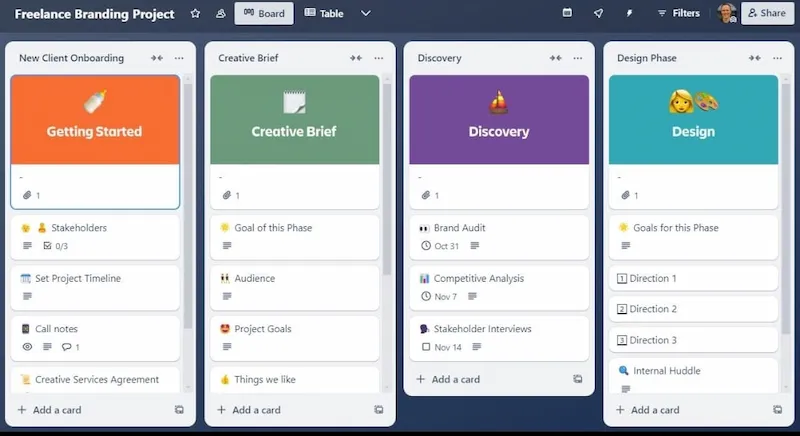
| Trello | Free–$10/mo | Visual thinkers, simple projects | Kanban boards, integrations, free tier solid |
| Asana | Free–$13.49/mo | Complex dependencies, timelines | Gantt charts, dependencies, progress tracking |
| Monday.com | $12–$24/mo | Team workflows, client collaboration | Beautiful UI, client portal, automation |
| ClickUp | Free–$9/mo | Everything + the kitchen sink | Docs, goals, time tracking, all in one |
Quick pick: Start with Trello Free.
If you outgrow it (5+ projects), upgrade to Asana Free or ClickUp Free.
3. Time Tracking (For Billable Freelancers)
If you bill by the hour, this is money on the table. Most freelancers undertrack time by 10-20%, essentially giving clients free work.
| Tool | Cost | Best For | Key Feature |
|---|---|---|---|
| Toggl Track | Free–$10/mo | Simple hourly tracking | One-click start/stop, project categorization |
| Clockify | Free–$7.99/mo | Team timesheets | Unlimited users on free tier |
| Harvest | $12/mo | Time + invoicing combo | Integrates with FreshBooks, Asana, Trello |
| RescueTime | Free–$12/mo | Passive tracking | Tracks time automatically; good for detailed analysis |
Quick pick: Toggl Track Free (simplest) or Harvest ($12/mo)
If you want time tracking + invoicing combined.
4. Communication & Client Management
This is where you lose relationships. No CRM = no history = you sound like you don’t remember clients.
| Tool | Cost | Best For | Key Feature |
|---|---|---|---|
| HubSpot CRM | Free | Lead tracking, email logging | Free forever, integrates with Gmail/Outlook |
| Moxie | $9–$50/mo | All-in-one for solopreneurs | Invoicing + CRM + projects in one |
| Pipedrive | $14–$99/mo | Sales-focused freelancers | Pipeline visualization, automation |
| Gmail + filters + labels | Free | Budget option | Use folders and labels to organize |
Quick pick: Start with HubSpot Free (logs emails, tracks contacts).
Graduate to Moxie ($9/mo) when you want invoicing + CRM combined.
5. Email & Calendar Management
Email management tools save 3-5 hours/week for client-heavy freelancers.
| Tool | Cost | Best For | Key Feature |
|---|---|---|---|
| Superhuman | $30/mo | Power users, constant email | Fastest email client on Earth; AI sorting |
| Outlook + Rules | Free | Default option | Built-in snooze, scheduling, rules |
| Slack | Free–$15/mo | Team collaboration | Better than email for quick updates |
| Calendly | Free–$12/mo | Scheduling calls | Automatic scheduling, no back-and-forth |
Quick pick: Calendly Free (eliminates “what time works?” emails) + Gmail with filters (free).
RELATED READING: How to Start Freelancing—The Complete Beginner’s Guide (2026)
The Automation Layer: Where the Real Magic Happens
Tools are great. But tools connected together? That’s where freelancers reclaim 10+ hours/week.
Automation means: when X happens, automatically do Y without touching it.
Examples:
- New email arrives → automatically log in to HubSpot → send template response → add to project → remind me in 3 days
- Invoice sent → auto-send payment reminder after 7 days → escalate if unpaid after 30 days
- Toggl time entry created → auto-calculate billable amount → add to FreshBooks → email to client
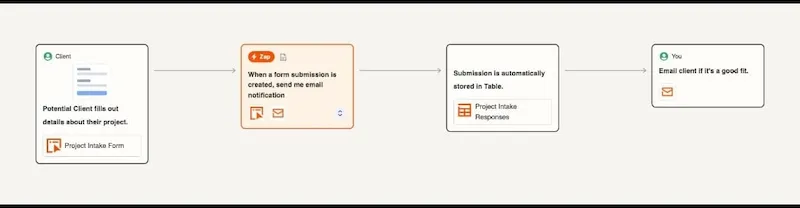
- New client inquiry via form → create contact in HubSpot → create project in Trello → send welcome email
Best Automation Platforms for Freelancers
| Platform | Cost | Best For | Learning Curve |
|---|---|---|---|
| Zapier | Free–$19.99/mo | Beginners, simple workflows | Very easy; 5 min to first automation |
| Make | Free–$9/mo | Intermediate users | Medium; more powerful than Zapier |
| n8n | Free (self-hosted) or $20/mo | Technical users, complex workflows | High; but most flexible |
Honest take:
- Zapier = simplicity + cost. Best for 80% of freelancers.
- Make = power + cost. Best for 15% of freelancers building complex workflows.
- n8n = maximum flexibility + learning curve. Best for 5% of technical freelancers.
Real Case Study: How One Freelancer Saved 25 Hours/Week
Case Study Note:
The following example is an illustrative case study based on common freelancer workflows and widely reported automation practices. Individual results will vary depending on pricing, workload, client volume, and the types of automations implemented. The purpose is to demonstrate how automation can improve efficiency rather than guarantee specific financial results.
Meet Ada: Virtual Strategist
Before:
- 8 clients across different niches
- 30 hours/week of admin work (invoicing, follow-ups, scheduling, time tracking, email)
- $4,000/month revenue
- Exhausted, no time to market or take on new clients
- Late invoices = 45-day payment cycles
Her tool stack:
- FreshBooks ($12/mo) – invoicing + accounting
- Asana Free – project tracking
- Toggl Track ($10/mo) – time tracking
- HubSpot Free – contact management
- Calendly Free – scheduling
- Zapier Pro ($19.99/mo) – the glue
Total monthly cost: $42/mo (~$500/year)
The Automations She Built
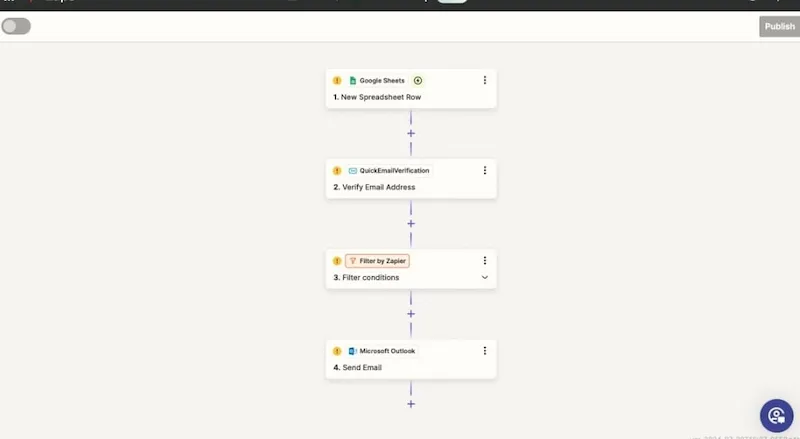
Automation 1: Invoice Creation + Payment Reminders
- Trigger: Time entry logged in Toggl for 40+ hours
- Action: Create invoice in FreshBooks using time data
- Result: Invoices auto-create instead of manual entry (saves 2 hours/invoice)
- Secondary action: After 7 days unpaid, send payment reminder email automatically
Impact: Went from 45-day payment cycles to 18-day cycles. $6,000 more cash flow at any given time.
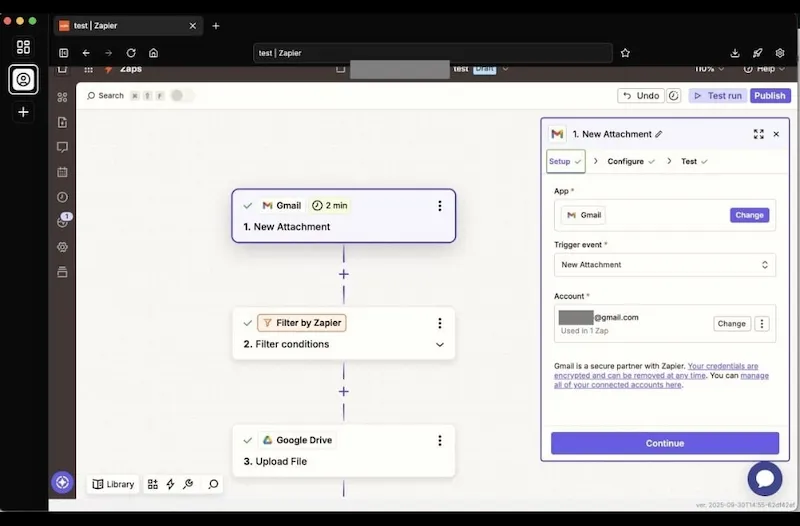
Automation 2: Client Inquiry → Onboarding
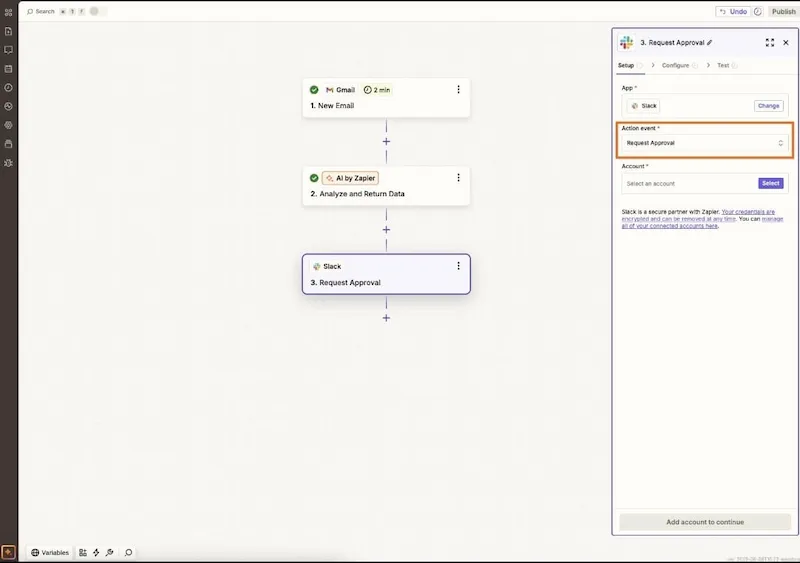
- Trigger: New email arrives in inbox with “inquiry” keyword
- Actions:
- Create contact in HubSpot
- Create “New Prospect” project in Asana
- Add contact to email sequence
- Create calendar reminder to follow up in 24 hours
Impact: No more lost prospects. Every inquiry is automatically logged and tracked. She never forgets a follow-up.
Automation 3: Project Kickoff Sequence
- Trigger: New project created in Asana with tag “new_project”
- Actions:
- Send welcome email template to client
- Create kickoff call link in Calendly
- Create checklist in Asana (template)
- Create invoice draft in FreshBooks
- Add to project tracking spreadsheet
Impact: Eliminates 45 minutes of manual setup per new project. On average, 2-3 new projects/month = 1.5-2 hours saved/month.
Automation 4: Social Media Posting
- Trigger: Every Tuesday at 10 am
- Actions:
- Pull week’s case studies from HubSpot
- Generate Twitter/LinkedIn captions using ChatGPT
- Post to Twitter, LinkedIn, Facebook automatically
- Track clicks via Bit.ly
Impact: Consistent social presence without daily manual posting. Saves 1-2 hours/week.
Automation 5: Weekly Time/Revenue Summary
- Trigger: Every Friday at 5 pm
- Actions:
- Pull time entries from Toggl
- Calculate billable hours + revenue
- Pull unpaid invoices from FreshBooks
- Send summary email to herself
Impact: Know her financial position every week without digging through spreadsheets. Takes 15 minutes instead of 45 minutes.
The results after 4 weeks of setting up automations:
| Metric | Before | After | Change |
|---|---|---|---|
| Admin hours/week | 30 hours | 5 hours | -83% |
| Monthly revenue | $4,000 | $5,600 | +40% |
| Days to payment | 45 days | 18 days | 27 days faster |
| New clients/month | 1 | 4 | 4x more |
| Time spent on marketing | 2 hrs/week | 8 hrs/week | 4x more |
The math:
- Reclaimed 25 hours/week × $100/hour = $2,500/week in recovered time value
- That $2,500/week was spent on marketing + taking on new clients
- New clients brought in $1,600/month additional revenue
- Faster payments improved cash flow by ~$6,000
Total impact: She went from $4,000 → $5,600/month revenue (+40%) AND gained 25 hours/week back to her life.
The tool stack cost: $42/month = $500/year.
Understanding the ROI
Automation often produces a strong return because it reduces repetitive work rather than replacing your expertise. Even saving one or two hours each week can quickly offset the monthly cost of software subscriptions.
The exact return depends on your hourly rate, number of clients, and how consistently you use the tools.
For many freelancers, the biggest benefits are:
- Faster invoicing and improved cash flow
- Fewer missed follow-ups
- More time for marketing and client acquisition
- Reduced administrative stress
- Better consistency across projects
Instead of focusing on a specific ROI figure, measure success by tracking the hours you reclaim each month and how you reinvest that time into higher-value work.
Building Your Freelancer Automation Stack
Here’s how to build this step-by-step:
Month 1: Foundation
- Install: FreshBooks or Wave (invoicing)
- Install: Trello or Asana (projects)
- Install: HubSpot Free (CRM)
- Cost: $0-$25/month
- Goal: Get basic tools working, start tracking manually
Month 2: Connection
- Install: Zapier Free (automation)
- Create first automation: Email → HubSpot contact
- Create second automation: Invoice sent → payment reminder
- Cost: $0-$45/month
- Goal: Experience the “aha” moment of automation
Month 3: Optimization
- Upgrade: Zapier Pro ($19.99/mo) if using more than 5 Zaps
- Add: Toggl Track (time tracking) if billable
- Add: Calendly (scheduling)
- Create automations: Project creation → client email + reminder
- Cost: $50-$100/month
- Goal: Reclaim 10+ hours/week
Month 4+: Polish
- Build: Advanced automations (weekly reports, lead scoring, etc.)
- Document: Your workflows so you can replicate them
- Optimize: Look for more manual tasks to automate
- Cost: $100-$150/month (mature stack)
The Tools Everyone Asks About
ChatGPT vs. Jasper vs. Copywriting Tools
For freelancers: ChatGPT Plus ($20/mo) covers 95% of writing needs. Jasper ($49/mo) is overkill unless copywriting is your main product.
READ ALSO: Best AI Tools in 2026 to Work Smarter, Earn More, and Stay Ahead
Slack vs. Email
For solopreneurs: You don’t need Slack. Email + Calendly + Zapier is enough.
For teams: Slack saves time on quick updates, but costs $4-15/mo per person.
ClickUp vs. Asana vs. Trello
- Trello: Simplicity wins. Best for 1-3 projects.
- Asana: Power user choice. Best for 4+ projects with dependencies.
- ClickUp: Everything + complexity. Only use if you genuinely need all features.
Do I Need Zapier, Make, or n8n?
- Zapier: 90% of freelancers. Easy, 8,000+ integrations, reliable.
- Make: If you need complex logic, multi-step workflows, or data transformation.
- n8n: If you’re technical and want to self-host or need ultimate customization.
Common Automation Workflows for Freelancers
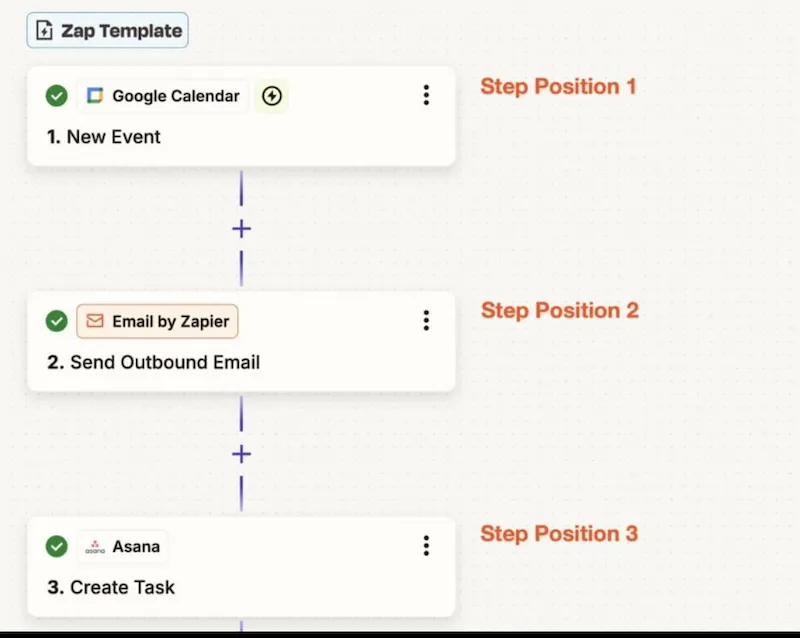
Workflow 1: Inquiry to Invoice Pipeline
New inquiry (email/form)
→ Create contact in CRM
→ Send welcome email
→ Create project in task manager
→ Schedule kickoff call in calendar
→ Create invoice draft in accounting tool
Tools needed: Email/form + HubSpot + Zapier + Asana + Calendly + FreshBooks
Time saved: 45 minutes per new project
Frequency: 2-3x/month for most freelancers = 1.5-2 hours/month saved
Workflow 2: Time Entry to Invoice to Payment Reminder
Time logged in Toggl (40+ hours)
→ Create invoice in FreshBooks
→ Notify freelancer
→ On day 7 unpaid: send reminder
→ On day 30 unpaid: send escalation
Tools needed: Toggl + FreshBooks + Zapier
Time saved: 2 hours per invoice (manual creation + tracking)
Frequency: 1x/week average = 8+ hours/month saved
Workflow 3: Lead Scoring & Prioritization
New contact added to CRM
→ Score based on email domain, interactions, value
→ High-value leads → immediate follow-up task
→ Low-value leads → nurture sequence
Tools needed: HubSpot + Zapier
Time saved: 30 minutes/week (manual filtering)
Impact: Higher conversion rate on high-quality leads
Workflow 4: Social Media Batch Posting
Every Monday, 9 am
→ Pull week’s case studies/wins from notes
→ Generate LinkedIn + Twitter captions
→ Create 5 posts for the week
→ Schedule across platforms
Tools needed: Zapier + ChatGPT + Buffer or Hootsuite
Time saved: 2-3 hours/week (batch creation + scheduling)
Impact: Consistent brand presence, 20-30% more engagement from consistency
Workflow 5: Weekly Business Health Report
Every Friday, 5 pm
→ Pull unpaid invoices from accounting
→ Calculate revenue YTD
→ Get time tracking summary
→ Pull open projects from task manager
→ Send email summary
Tools needed: Zapier + accounting tool + time tracking + project manager
Time saved: 45 minutes/week (manual compilation)
Impact: Know your business status without digging through tools
Global Freelancer Tool Considerations
For Non-US Freelancers
Currency & Payments:
- Invoicing tools: Wave, FreshBooks, Stripe all handle multi-currency
- Payment platforms: Wise (formerly TransferWise) for better rates on conversions
- Accounting: QuickBooks handles foreign currency, but local tools may be better (check your country’s tax requirements)
Time Zones:
- Use Calendly’s auto-timezone feature (shows your time in client’s timezone)
- Slack + async communication tools > synchronous meetings
- Automation scheduling in Zapier: schedule actions for client’s business hours
Local Compliance:
- Invoicing: Check if your country requires specific invoice format/numbering
- Accounting: Some countries require local accounting software
- GDPR (EU), CCPA (US), etc.: Use tools SOC 2 compliant
For Teams (Beyond Solo)
- Add: Slack ($4-15/mo per person) for communication
- Add: Asana or Monday.com for shared visibility
- Add: Google Workspace ($6-14/mo per person) for email + docs
- Add: Stripe or PayPal for team payments
- Automation becomes critical to avoid bottlenecks
Troubleshooting: When Automation Breaks
Automation not triggering:
- Check the trigger condition (is it spelled correctly?)
- Make sure the app is connected (re-authenticate if needed)
- Test with manual trigger first before using scheduled trigger
Data going to wrong place:
- Verify field mapping (the “which field goes where” settings)
- Check if source and destination have the same field names
- Use a test record first before automating the whole flow
Automation running too many times:
- Add a filter to the trigger (so it only runs in specific cases)
- Add a delay between runs (prevents duplicate actions)
- Check if another automation is triggering the same workflow
Tool limits reached:
- Most free tiers have limits (Zapier Free = 100 tasks/month)
- Track your usage and upgrade before hitting limits
- Consider consolidating workflows (combine 3 small zaps into 1)
Security & Privacy Best Practices
Automation often involves connecting multiple services that may contain sensitive client information. Taking a few simple precautions can significantly reduce your security risk.
• Enable multi-factor authentication (MFA) on all business accounts.
• Use a reputable password manager to generate unique passwords.
• Regularly review which apps have access to your accounts and remove unused integrations.
• Back up important automation workflows so they can be restored if something breaks.
• Avoid storing sensitive client information in unsecured notes or spreadsheets.
• Keep your software and browser up to date to benefit from the latest security patches.
A few minutes spent securing your workflow can prevent costly disruptions later.
FAQ: Freelancer Tools & Automation
Q: How long does it take to set up a Zapier automation?
A: 5-15 minutes for simple workflows (3-4 steps). 30-60 minutes for complex workflows with multiple conditions. The first one is hardest; the 5th one takes 5 minutes.
Q: Will automation make me look less personal?
A: No, if done right. Automation handles the repetitive stuff (reminders, data entry, scheduling) so you have more time for actual client conversations and personalization. Ada spent 30 hours on admin → now spends 25 hours on actual strategy for clients.
Q: What if the automation fails?
A: Build in error handling. For critical workflows (invoicing), have the automation notify you if it fails so you can manually finish it. Non-critical workflows (social posting) can be set-and-forget.
Q: Is Zapier secure?
A: Yes. Zapier is SOC 2 compliant and encrypts all data in transit and at rest. Same security as the individual tools you’re connecting.
Q: Can I automate client deliverables?
A: Partially. You can automate the delivery method (email, Dropbox, etc.) but the actual deliverable should be quality-checked by you first. Automation handles delivery, not quality control.
Q: How much should I spend on tools total?
A: $0 to $150 per month depending on your revenue and complexity. A simple rule: spend no more than 5 percent of your monthly revenue on tools. If you make $3,000 per month, your maximum tool spend is $150.
Q: Should I use an all-in-one tool or best-of-breed?
A: It depends on your workflow.
All-in-one platforms like ClickUp or Notion are excellent if you prefer managing projects, documents, and tasks from a single workspace with fewer integrations.
Best-of-breed tools combine specialized software such as FreshBooks for invoicing, Trello for project management, and Zapier for automation—which often provides deeper functionality in each area.
If you’re just starting, keeping everything in one platform can reduce complexity. As your business grows, you may find that connecting specialized tools gives you greater flexibility and automation options.
Q: What if I’m not technical?
A: Start with Zapier (non-technical), not n8n (technical). 95% of freelancer automations are simple, and Zapier is perfect.
Recommended Tool Stack by Freelancer Type
Freelance Writer
- Invoicing: Wave (free)
- Projects: Trello Free
- Time tracking: Toggl Track Free
- Automation: Zapier Free
- Writing: ChatGPT Plus ($20)
- Social: Buffer Free
- Total cost: $20/month
- Automations to build: Inquiry → project creation, batch social posting, invoice reminders
Freelance Designer
- Invoicing: FreshBooks ($6.50/mo)
- Projects: Asana (free)
- Portfolio: Behance or custom site
- Automation: Zapier Free
- Design: Canva Pro ($15/mo)
- Client reviews: Calendly Free
- Total cost: $21.50/month
- Automations to build: New project → template checklist, client feedback request, invoice automation
Freelance Developer
- Invoicing: FreshBooks ($6.50/mo)
- Projects: Linear or GitHub Projects (free)
- Time tracking: Toggl Track ($10/mo)
- Automation: Make ($9/mo) for complex workflows
- Communication: Slack Free
- Testing: Postman (free)
- Total cost: $25.50/month
- Automations to build: Deployment completion → invoice, bug reports → project, time logs → payments
Freelance Coach/Consultant
- Invoicing: FreshBooks ($6.50/mo)
- Scheduling: Calendly ($12/mo)
- CRM: HubSpot Free
- Automation: Zapier Free
- Communication: Slack Free
- Email sequences: Mailchimp Free
- Total cost: $18.50/month
- Automations to build: Booking → confirmation email, end of session → feedback form, unpaid invoice → reminder
The Bottom Line
Most freelancers work 40+ hours/week and spend 25-30% of that on admin. The tools exist today to cut that by 80%.
The real cost of not automating:
- $300-600/month in wasted billable time
- 10-15 hours/week you could spend on marketing, learning, or family
- 15-20% slower payment cycles (cash flow problem)
- Client relationships missed due to forgotten follow-ups
The cost of implementing:
- $20-100/month for tools
- 4-8 hours setup (first month only)
- 30 minutes/month maintenance
The ROI:
- 20-30 hours/week reclaimed = $2,000-$3,000/month value
- 2-3x faster payment cycles = $5,000-15,000 more cash flow
- Time spent on marketing = 2-4 new clients/month
- Net: Every $1 in tools = $10-20 in value
Start with the FreshBooks + Trello + Zapier combo. Build one automation per week. In a month, you’ll have reclaimed enough time to take on more work or finally take a real vacation.
The freelancers winning in 2026 aren’t the ones working the hardest. They’re the ones working the smartest, by letting tools do the repetitive work while they focus on the client-facing, high-value work only they can do.
DIVE DEEPER: How to Build Wealth Online—A Complete Roadmap for the Digital Generation
Ready to get started? Pick one automation from the case study above that matches your workflow. Build it this week. See the time saved. Then build the next one. In 30 days, you’ll wonder how you ever worked without it.
Sources
- n8n 2026 Automation Report —
https://blog.n8n.io/best-ai-workflow-automation-tools/ - Zapier Platform Documentation —
https://zapier.com - Wave Accounting —
https://www.waveapps.com - G2 Software Reviews —
https://www.g2.com - Capterra Tool Comparisons —
https://www.capterra.com