
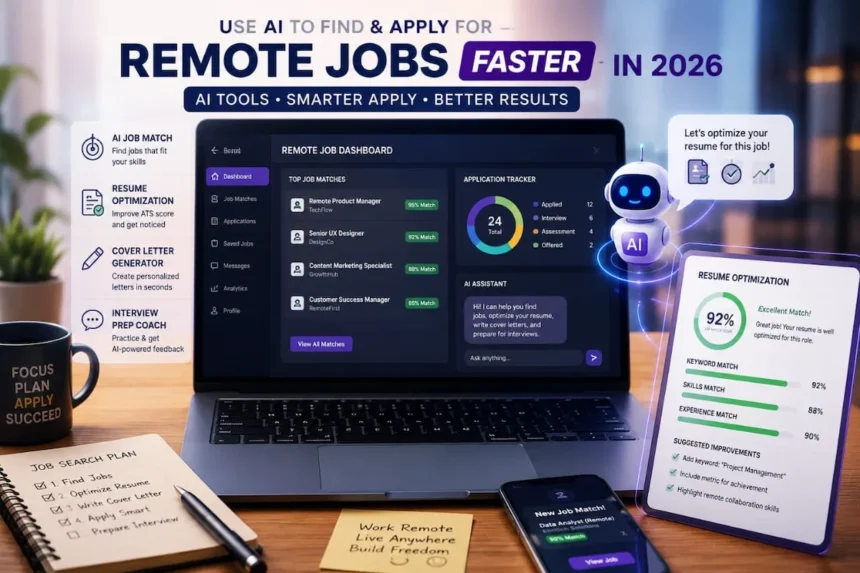
Quick Answer: Understanding how to use AI to find remote jobs in 2026 is one of the most valuable skills any job seeker can develop right now. With the right AI tools, you can automatically match your skills to job listings, optimize your resume to pass ATS filters, generate personalized cover letters in minutes, and even practice for interviews, all in a fraction of the time traditional job-hunting takes. Tools such as Teal HQ, Jobscan, ChatGPT, and Yoodli handle repetitive work so you can focus on landing the right roles. Start with one tool today, and you’ll likely see a noticeable improvement in speed and response rate.
Who This Is For: This guide is written for remote professionals, digital talent, and active job seekers looking to reduce search times, outmaneuver corporate tracking filters, and safely scale application output without sacrificing personalization.
TL;DR Top-Line Checklist
- Discover: Outsource search filtering to AI recommendation boards.
- Optimize: Align target keywords to secure an 80%+ ATS match score.
- Draft: Generate tailored, human-sounding cover letter frameworks in under 60 seconds.
- Prep: Run simulated behavioral mock interviews using interactive speech coaches.
- Scale: Deploy API-driven auto-apply tools safely to handle routine volume.
Why Traditional Job Hunting is Slow
Searching for remote jobs manually means spending hours on platforms like LinkedIn, We Work Remotely, Indeed, and RemoteOK, scanning and re-scanning overlapping listings. Because opportunities are scattered across dozens of sites, many job seekers repeat the same searches every day.
Writing applications repeatedly is another bottleneck. Many candidates tweak the same cover letter for dozens of roles, which becomes tedious and discouraging. On top of this, 98% of large companies now use Applicant Tracking Systems (ATS) to filter resumes before a human ever sees them. Research suggests that only about 25% of resumes pass these filters, even when the candidate is qualified.
That is exactly why learning how to use AI to find remote jobs gives you a real, measurable edge over candidates still searching manually: it accelerates discovery, tailors your materials, and automates routine tasks, giving you a real edge over manual applicants.
Step 1: How to Use Al to Find Remote Jobs Faster
AI-powered job search platforms help you discover and prioritize remote roles that fit your exact skills, experience level, and personal preferences. Rather than manually refreshing multiple sites, you can let specialized AI systems automatically surface highly relevant opportunities.
| Tool | Core Function | Pricing Model | Best For |
| Teal HQ | Tracks application lifecycles, manages interview pipelines, and builds base resumes. | Free + Paid Premium Tiers | Organizing high-volume job pipelines. |
| Otta | Curates highly relevant startup, tech, and innovative remote corporate listings. | 100% Free | Finding premium, verified remote tech and product roles. |
| Talentprise | AI-driven candidate matching that pitches profiles directly to international headhunters. | Free Entry + Paid Candidate Boosting | Getting discovered passively by global recruiters and talent matchers. |
| Jobscan | Scans resumes against live job descriptions to generate instant keyword match reports. | Limited Free Scans / Paid Subscription | Auditing ATS optimization levels and discovering hidden resume gaps. |
How to use them effectively:
- Create a detailed profile on each platform (skills, experience, preferred role type—full-time, part-time, freelance, remote, or hybrid, and salary range).
- Select “remote” and your preferred location zones or time-zone flexibility.
- Let the AI surface 10-20 relevant jobs daily instead of manually refreshing multiple sites.
Bonus: Reverse-engineer job descriptions with Al.
Before applying, paste the full job description into ChatGPT with this prompt:
“Extract the top 10 skills, keywords, and requirements from this job description. List them in order of importance.”
The exposed keyword list tells you exactly what to emphasise in your resume and cover letter.
Read also: Best AI Tools in 2026 to Work Smarter, Earn More, and Stay Ahead
Step 2: Optimize Your Resume Using AI
An Applicant Tracking System (ATS) is HR software that scans resumes for keywords, skills, and format before letting them reach a recruiter.
Knowing how to beat ATS filters with AI is what separates candidates who get callbacks from those who get ignored despite being qualified.
Because 98% of large employers use ATS, simply having strong experience isn’t enough; you need ATS-friendly formatting and keyword alignment.
Why resumes get rejected automatically:
- Missing required skills or experience level.
- Poor formatting (tables, images, complex columns) that breaks parsing.
- Lack of key ATS keywords from the job description.
- Applying outside the preferred location range or using a non-standard file type.
Best AI tools for resume optimisation:
These are the best AI resume tools in 2026 for getting past automated filters and into the hands of a real recruiter.
- Jobscan: Paste the job description and upload your resume to receive a match score and missing keywords. Aim for 80%+ match whenever possible.
- Rezi and Kickresume: AI-powered resume builders that rewrite your content while preserving your real experience.
- ChatGPT: Great for quick tweaks and rewriting bullet points.
Quick workflow:
- Copy the job description.
- Upload your resume to Jobscan and get the keyword list.
- Edit your bullet points using an AI-assisted prompt like:
“Rewrite these bullet points for a [Job Title] role. Make them achievement-focused and include these keywords: [list keywords]. Keep each point under two lines: [paste bullets].”
- Always read the final version aloud to keep your “voice” and avoid generic phrasing.
Real Test: ChatGPT and Jobscan on the Same Resume
I want to show you exactly what this looks like in practice, not just theory.
I took a real resume and ran it through Jobscan against a mid-level remote content strategist role. The initial ATS match score came back at 62 percent. Not terrible, but not good enough. Most hiring managers set their ATS threshold at 70 to 75 percent minimum, meaning this resume would have been filtered out before a single human eye ever saw it.
Here is what Jobscan flagged as missing:
- The phrase “content strategy” appeared zero times despite the role requiring it eight times in the job description
- “SEO” was mentioned once, but needed to appear at least four times
- “remote collaboration” and “async communication” were completely absent
- Several action verbs in the bullet points did not match the language used in the posting
Next step: I pasted the full job description and the resume bullet points into ChatGPT with this prompt:
“Rewrite these resume bullet points for a remote content strategist role. Make them achievement-focused and naturally include these keywords: content strategy, SEO, remote collaboration, async communication. Keep each point under two lines.”
ChatGPT rewrote the bullet points in under 30 seconds. I spent another 10 minutes editing them to make sure they still sounded like a real person wrote them and not a robot trying to pass a filter.
Ran the updated resume through Jobscan again.
The ATS score jumped from 62 percent to 84 percent.
Same person. Same experience. Same role. The only thing that changed was keyword alignment and bullet point language. That single change moved the resume from invisible to competitive.
That is not a trick. That is just understanding how the system works and using the right tools to work with it instead of against it.
Step 3: Write Cover Letters with Al
Using an AI cover letter generator in 2026 does not mean sending generic outputs, it means creating a strong framework in seconds and then personalizing it to stand out
Even though many remote job postings label cover letters as “optional,” a strong one still helps you stand out. It signals professionalism, remote-work readiness, and genuine interest in that role and company.
Recommended Al tools:
- ChatGPT

- Claude

- NotionAl
Fill-in-the-blank prompt you can reuse:
“Write a professional but warm cover letter for a [Job Title] position at [Company Name]. I have [X] years of experience in [your main skill/area]. Key achievements include [list 2-3 achievements]. The role focuses on [main responsibilities from the job description]. Explain why I’m excited about this company because [specific reason, e.g., their product or values]. Keep it under 350 words and sound natural.”
Key editing rule
Never copy-paste the raw Al output. Instead, spend 5-15 minutes to:
- Add a specific detail about the company.
- Adjust the tone to match your personality.
- Include a concrete example from your own experience.
Even small personalized edits can significantly increase your chances of an interview.
Step 4: Use AI to Prepare for Interviews
Al can compress your interview preparation from days to focused hours with targeted practice.
Helpful tools:
- ChatGPT: Simulate mock interviews and get feedback-style suggestions on your answers.
- Yoodli: Al speaking coach that analyses your filler words, pace, and non-verbal cues during video practice.
- Warmup by Google: Free interview-practice tool for common questions and response feedback.
How to research a company before an interview
Feed ChatGPT the company’s website and prompt:
“Summarise this company’s mission, recent projects, challenges they’re facing, and company culture based on the information below.”
Then tailor your answers around that summary.
Use the STAR method for behavioural questions
- Situation: Set the scene and context.
- Task: Describe the problem or responsibility.
- Action: Explain the steps you took.
- Result: Share the outcome, ideally with numbers.
Ask ChatGPT to convert your experiences into STAR-style answers:
“Turn this experience into a STAR-method answer to the question: ‘Tell me about a time you worked under pressure.'”
Always edit the final answer to sound like you, not an AI.
Step 5: Automate Repetitive Applications (Without Spam)
By this point, you have a clear picture of how to use AI to find remote jobs; now it is time to scale that system without sacrificing quality.
Once your resume and cover letter system is polished, you can automate the low-value parts of applying.
Auto-apply tools to know in 2026:
- LazyApply and Simplify: Auto-fill applications on LinkedIn, Indeed, and Wellfound.
- JobCopilot: Automatically applies to hundreds of remote-friendly roles per week based on your preferences; users report 2-3x more interview requests than manual applying.
- LoopCV and Jobright: AI-driven tools that match and apply to roles and track responses.
Related Reading: How to Start Freelancing: The Complete Beginner’s Guide (2026)
Smart workflow:
- Scrape 10-20 relevant listings using Teal HQ or Otta.
- Batch-optimize your resume against those with Jobscan.
- Set up JobCopilot or LazyApply with your filters (remote, salary, experience level).
- Let the tool auto-apply to the bulk, while you personally tailor the top 5-10 roles you genuinely want.
Data Privacy & Platform ToS Risk Warning
When deploying auto-apply tools, look closely at their integration mechanisms. Legitimate platforms utilize official API connections or secure browser extensions that interact with fields directly on your active browser screen. Never input raw passwords or master account credentials directly into unverified third-party applications. Additionally, aggressive mass-spamming violates LinkedIn’s User Agreement regarding automated scraping and account scripting. Keep automated actions capped at normal human limits to prevent profile restrictions.
How to Track Your AI Job Search Engine (KPIs & Metrics)
These remote job search tips for 2026 treat your application pipeline like a sales funnel because that is exactly what it is.
To run a highly successful remote job search, you must treat your application pipeline like a standard sales funnel. Monitor these core KPIs weekly to diagnose and fix bottlenecks in your strategy:
- Application Velocity: Target 15–25 optimized applications per week. If your output is lower, loosen your search queries or expand your automated discovery filters.
- Funnel Conversion Rate (Cold Application-to-Interview): Your target benchmark is 10% to 15%. If your response rate drops below 10%, your resume is either failing automated ATS keyword filters or your cover letters are sounding too generic and robotic.
- Interview-to-Offer Conversion Rate: Your target benchmark is 20%. If you successfully secure interviews but fail to receive offers, your verbal communication pacing, camera presence, or STAR storytelling needs adjustment.
Also, set up smart alerts on LinkedIn, Indeed, or RemoteOK.
Create alerts filtered by:
- “Remote”
- Your job title(s)
- Desired salary range
New matching jobs will land directly in your inbox instead of requiring constant manual searches.
Step 6: Avoid Al Job-Search Scams
As AI job tools grow popular, so do scams targeting job seekers.
Red flags to watch for:
- “We’ll apply to 500 jobs for you overnight”: Legitimate tools apply based on curated filters, not mass spam.
- Upfront payment for “guaranteed” job placement: No ethical platform can guarantee a job.
- Requests for your login credentials: Legitimate tools use API integrations, not your password.
- Fake job listings with no company name or vague descriptions: Always cross-check on LinkedIn or the company’s official site.
- Too-good-to-be-true salaries for entry-level roles: They are often phishing attempts to harvest personal data.
Stick to well-reviewed platforms, read the terms of service, and avoid giving control of your primary accounts.
Final Thoughts
By using AI to:
- Discover and prioritise remote roles,
- Optimize your resume and cover letter,
- Prepare confident interview answers,
- Automate repetitive applications,
You can reduce weeks or months of manual work into a lean, repeatable workflow. Instead of ghosting-style silence, you’ll see more interviews, clearer feedback, and better-qualified opportunities.
Don’t try to do everything at once.
The goal is simple. Master how to use AI to find remote jobs step by step, starting with one tool and building from there.
Start with one tool (e.g., Teal HQ or Jobscan) and one step (e.g., resume optimisation).
Small daily actions compound into real progress, and your next remote opportunity could be just a few smart, AI-assisted applications away.
Frequently Asked Questions (FAQs)
Q1: Does using AI to apply for jobs actually work?
Yes, but only when you use it the right way.
AI tools do not replace your skills or experience; they make sure those skills actually get seen by a recruiter instead of getting filtered out by an ATS system. The real test is straightforward: running a resume through Jobscan and ChatGPT moved an ATS match score from 62 percent to 84 percent on the same resume.
The experience did not change. The visibility did.
Q2: Will employers know I used AI to write my resume or cover letter?
Only if you let them.
Raw, unedited AI output sounds generic, and recruiters notice it immediately.
The rule is simple: use AI to create the framework, then spend 10 to 15 minutes adding your own voice, specific company details, and real examples from your experience.
That combination is what gets interviews.
The AI handles the structure and the keywords. You handle the personality and the proof.
Q3: How many jobs should I apply to per week?
Based on the KPIs covered in this guide, the target is 15 to 25 optimized applications per week.
The emphasis is on optimized, meaning each resume has been run through Jobscan and scored at 80 percent or above for that specific role.
Ten highly optimized applications will almost always outperform fifty generic ones.
Q4: Is auto-applying safe for my LinkedIn or Upwork profile?
It depends entirely on how you do it.
Legitimate auto-apply tools like JobCopilot and LazyApply use official API connections and work within platform limits.
What gets accounts flagged or restricted is aggressive mass-spamming that mimics bot behavior. Keep your automated actions within normal human limits, never share your login credentials with unverified tools, and always personally review the top roles you genuinely want before submitting.
Q5: What is the best free AI tool to start with for job searching?
If you are starting from zero, begin with ChatGPT on the free tier.
It handles resume bullet point rewrites, cover letter drafts, company research, and mock interview practice all in one place, all for free. Once you are getting responses and ready to optimize more seriously, add Jobscan for ATS scoring and Teal HQ for pipeline management.
Q6: How long does it realistically take to land a remote job using these tools?
Based on typical beginner timelines, most people who apply these steps consistently start seeing interview requests within two to four weeks.
The biggest variable is not the tools; it is consistency. Five targeted, optimized applications per day with properly tuned resumes and personalized cover letters compound quickly.
The people who take months are usually the ones who apply in bursts and then go quiet. Show up every day, and the tools will do the rest.
References & Further Reading
- Jobscan Research Bureau — 98% of Fortune 500 Companies Use Applicant Tracking Systems:
https://www.jobscan.co/blog/98-percent-fortune-500-companies-use-applicant-tracking-systems/ - Federal Trade Commission — Job Scams: How to Recognize and Avoid Fraudulent Employment Schemes (2025):
https://consumer.ftc.gov/articles/job-scams - Harvard Business School — Hidden Workers: Unfiltered Employment (2021): https://www.hbs.edu/managing-the-future-of-work/Pages/default.aspx
- Teal HQ — AI Job Search and Application Tracker:
https://www.tealhq.com - Jobscan — AI Resume Optimization and ATS Matching:
https://www.jobscan.co - Yoodli — AI Interview and Speech Analytics Coach:
https://www.yoodli.ai - JobCopilot — AI Auto-Apply Platform for Remote Jobs:
https://jobcopilot.com - Simplify — Automated Job Application Tool:
https://simplify.jobs - Interview Warmup by Google — Free AI Interview Practice:
https://grow.google/certificates/interview-warmup/ - We Work Remotely — Remote Job Board:
https://weworkremotely.com









Test, message – Thank you!